
 Featured
Cursor
Screenshots
 1 / 2
1 / 2The Story
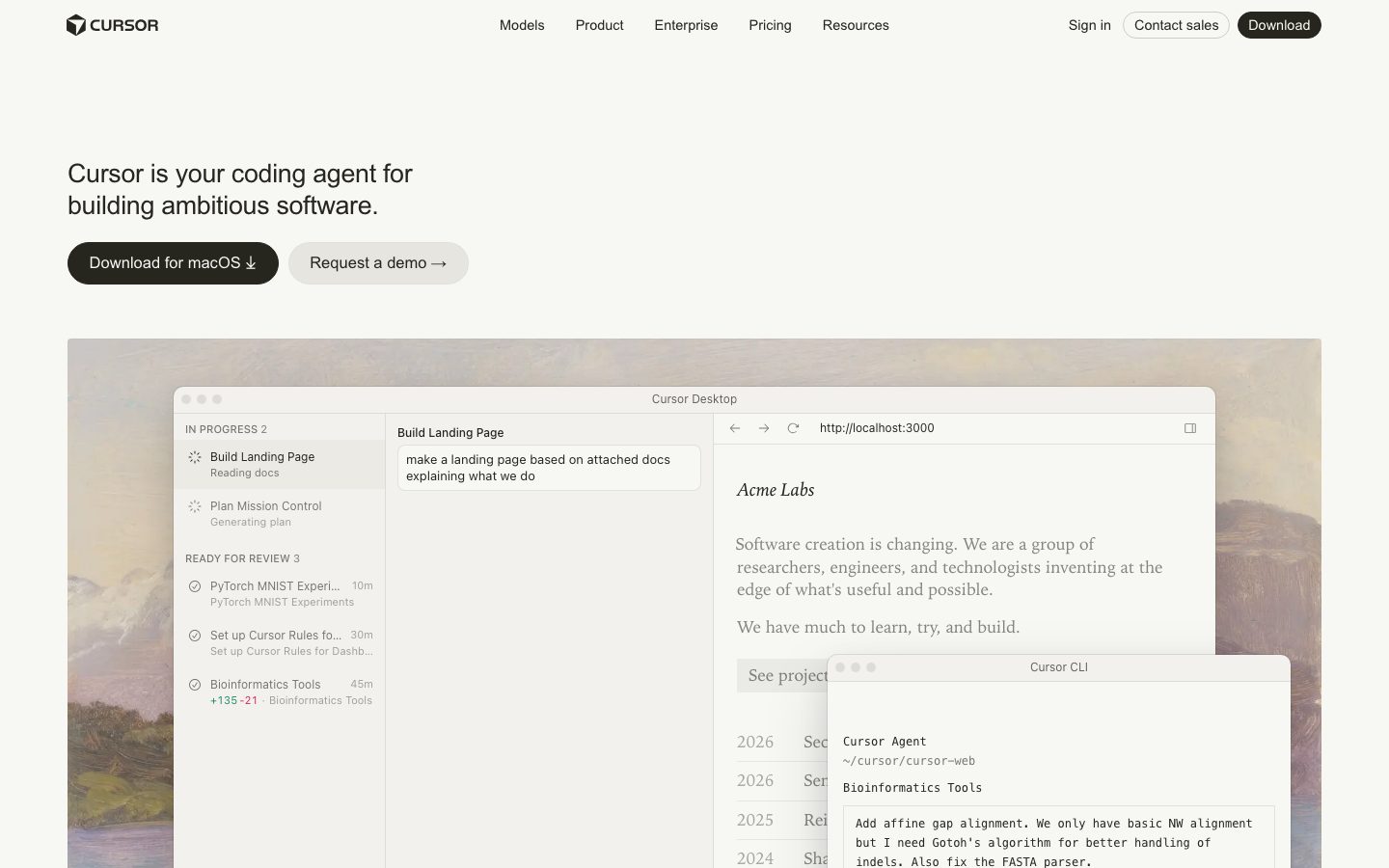
Cursor is a code editor that embeds AI assistance directly into the editing surface. It is built as a fork of VS Code, so extensions, themes, and keybindings carry over, but the assistant is a first-class part of the interface rather than a plugin.
The core interaction is the inline edit: select code, describe the change in natural language, and review a diff before accepting. Alongside that, a chat panel can read the open files and answer questions about the codebase, and an agent mode can make multi-file changes with a plan the developer approves.
The editor indexes the repository so answers reference the project's own code rather than generic patterns. Teams that adopt it typically keep a review step, because the assistant's output still needs the same scrutiny as any other contribution. The company publishes a changelog and documentation, which is what makes the feature set checkable.
Overview
Cursor's design choice is that the AI lives in the editor rather than beside it.
The inline edit is the primary interaction. A developer selects a range, describes the change, and reviews a diff before it is applied. Nothing is written to disk until the diff is accepted.
A chat panel answers questions about the codebase with the open files in context. Because the repository is indexed, answers can reference the project's own functions and conventions rather than generic examples.
Agent mode extends this to multi-file work: the assistant proposes a plan, makes changes across files, and surfaces the diff for review. The review step is the important part - the output is a proposal, not a commit.
Key Features
- Inline edit with a diff
Changes are proposed as a reviewable diff rather than applied silently.
- Repository-aware chat
The codebase is indexed so answers reference the project's own code.
- VS Code compatibility
Extensions, themes, and keybindings carry over because the editor is a fork.
- Agent mode
Multi-file changes are proposed as a plan and a diff for the developer to approve.
Where Cursor is a strong choice, and where it is not
Choose Cursor if you want AI assistance inside the editor you already use, and you value reviewing a diff over accepting generated code blind.
Look elsewhere if you need a fully open-source editor, or if your organization cannot send code context to a hosted service.
Getting started
Autocomplete works as soon as the editor opens; the setup work is choosing which model to pay for.
- ~5 minTime to first completion
Install the editor, open a project, and completions begin without an index build or configuration.
- Free / $20Cost to start
A free tier covers limited requests. The paid plan is a flat monthly fee rather than metered token billing.
- NothingPrerequisites
A codebase and an account. No API key unless you bring your own model.
Known limitations
Confirmed constraints from the product's documentation and pricing page.
- Flat pricing hides a rate limit. The paid plan caps how many fast requests are included, and exceeding it drops you to a slower queue rather than a higher bill.
- Proprietary editor. It is a fork of VS Code, so extensions generally work, but the assistant and the editor are one product and cannot be separated.
- Code is sent to a model provider. Even in privacy mode, requests leave the machine, which rules it out for some codebases.
- Not a replacement for review. Generated edits still need the same scrutiny as any other change.
Pick Cursor if you want the assistant integrated rather than bolted on
The advantage over a plugin is that the model sees the whole project, not just the open file, which is what makes multi-file edits usable.
The product's bet is that the editor and the assistant should be one thing. That shows up in edits that span several files and in context the assistant gathers without being told.
If you need to stay in your existing editor, or if code cannot leave your machine at all, look at a plugin that can point at a local model instead.
FAQ
What is Cursor?
Cursor is a code editor built as a fork of VS Code that embeds AI assistance into the editing surface.
Is Cursor free?
Cursor lists a free tier alongside paid plans. Check the pricing page for current request limits.
Does Cursor support VS Code extensions?
Yes. Because Cursor is a fork of VS Code, extensions, themes, and keybindings carry over.
Does Cursor send my code to a server?
Cursor's hosted features send code context to its service. Check the current documentation and privacy terms before using it on sensitive repositories.
What stack is Cursor built with?
CompassPad records Cursor as a TypeScript and React application derived from VS Code, based on the public repository lineage and documentation.
What we checked
- LIVESite and primary link
The marketing site resolved and the primary product link reached the product itself.
- PRICINGPricing page
The pricing page resolved and lists the current plans and limits.
- DOCSDocumentation
Public documentation resolved and covers the product's core surfaces.
- CHANGELOGChangelog page
The linked changelog page resolved and is reachable without an account.
Discussion
No comments yet. Be the first.
Join the conversation. Sign up to comment.
Sign up free